What organizations can see about you, and what you control
The volunteer roster is off until you switch it on, and six checkboxes decide what goes with you. Here is what each one covers, and what travels with you regardless.
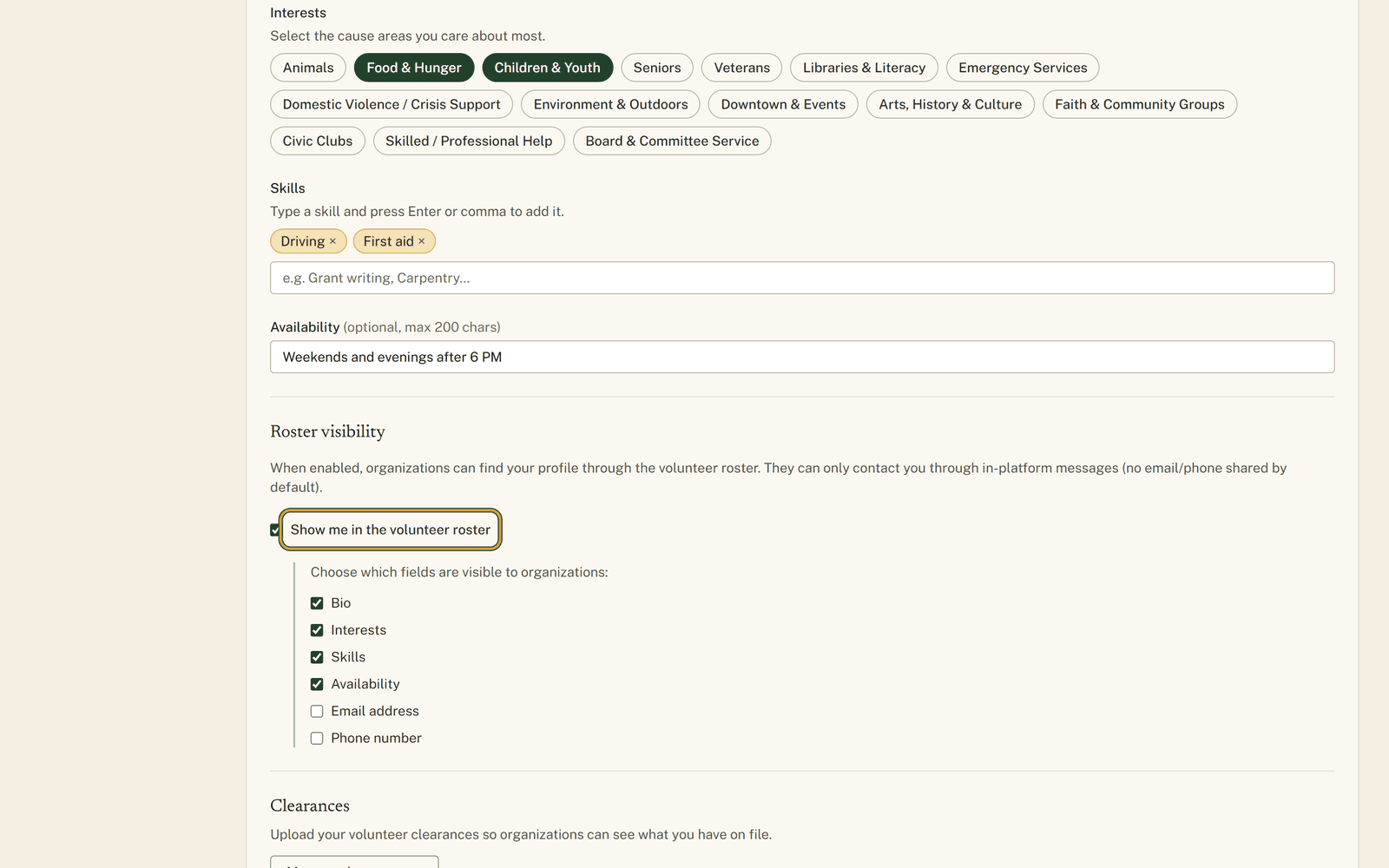
As things stand, unless you have gone and changed a setting, no organization on this site can look you up. You are not in any list they can search. That is where a volunteer account starts, and it stays there until you decide otherwise.
The setting that changes it is worth understanding before you touch it, because it works in two parts.
Being findable, and being contactable
There is a volunteer roster on the organization side of the site. Coordinators use it when they need somebody who can weld, or somebody with a Saturday, or somebody who already holds a clearance. Being in it means a group with a real need can find you instead of putting another notice in the paper.
The part people worry about is what comes with you. A retired welder in Avis put it well enough: he is glad for the fire company to know he can weld, and content for the food bank to know he has Saturdays, and his mobile number is another matter entirely.
In "Settings" from the volunteer menu, under the heading "Roster visibility", one checkbox puts you in the roster. Tick it and a short list appears underneath, a box each for your bio, interests, skills, availability, email address and phone number.
Email address and phone number start unticked, and that is a deliberate default rather than an oversight. Leave them alone and an organization writes to you through the site. You answer or you do not, and your number stays yours.
What has no checkbox
Your name goes with the listing. So do the kinds of clearance you hold, along with their dates, and organizations can search the roster for people holding a particular one. Neither of those has a box of its own.
For most people that is the point. A coordinator looking for someone with a current ChildLine clearance is exactly who you want finding you. If it is not what you want, the roster switch itself is the control you have. Leave it off and none of it applies.
The uploaded certificate is a separate matter, held back unless you tick the share box on that clearance row. And the roster search only counts clearances that are still current, though an expired one is still visible on your profile page marked as such. Removing the row takes it off both.
The view from the other side

Staff see cards with your name and whatever you left ticked, filters down the side, and a "Download CSV" link that saves the same fields to a spreadsheet. Coordinators have wanted that file since long before this site existed, and it is a fair thing to want. It is also the plainest argument for leaving the email and phone boxes alone, because a file that leaves the site is past anyone's control.
None of this is public. It is not on the website a neighbor would browse and it does not reach search engines. It opens to signed-in organization staff at poster level or above, which means local organizations broadly rather than only the ones you have already worked with.
One more thing worth doing while you are in there. A ticked box over an empty field shows nothing. If your bio, interests, skills and clearances are all blank, your card reads "No additional details shared.", which is honest and no use to anybody. Fill in "About you" first, then choose what to reveal.
Getting out is the same switch in reverse. Untick it, press "Save changes", and you are gone from the roster and its searches. Commitments and messages you already have stay put, since those came from you approaching an organization.
The switch, the field list and the organization-side view are all pictured at https://www.volunteerclintoncounty.org/help/roster-privacy
The welder ticked the switch, left his skills and availability showing, and left the phone box alone. Five minutes of thought, once, and it holds until he changes his mind.