You decide what organizations can see about you
One switch puts you in the volunteer roster, and the checkboxes under it decide how much of you goes along.
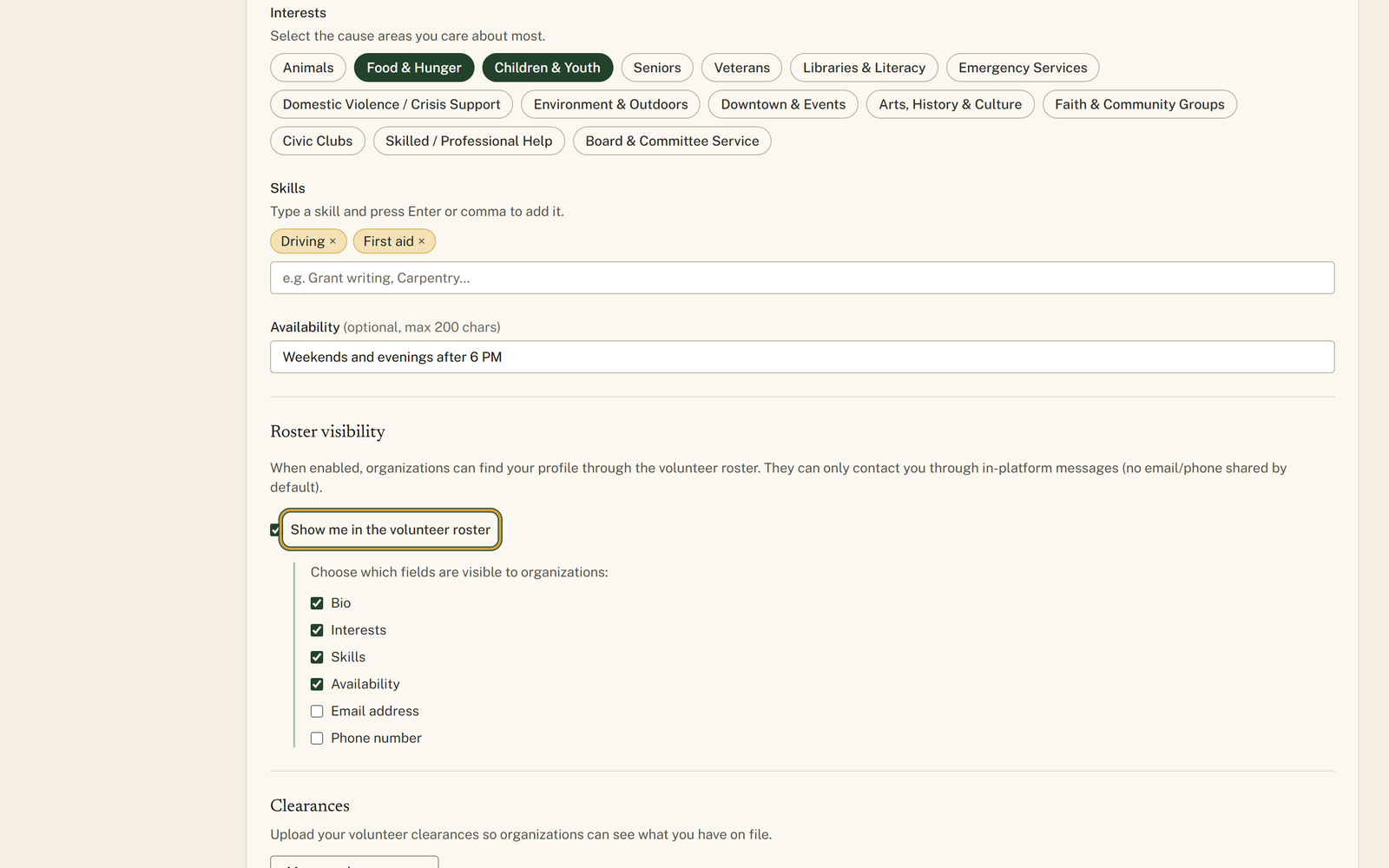
Roster visibility is a switch in your settings that lets organization staff find your profile in the volunteer roster, with its own checkboxes for what travels with you: bio, interests, skills, availability, email address and phone number. Email address and phone number start unticked, so an organization has to message you through the site. Your name and the types of clearance you hold go with the listing whenever the switch is on, and neither of those has a checkbox.
Who this is for: People weighing being findable against being contactable, especially the ones who have watched a phone number travel further than they meant it to.
Before you start: An account, since the roster is built from volunteer profiles.
- 1
Open "Settings" from the volunteer menu and scroll to the heading "Roster visibility".
- 2
Read the line under it, then tick "Show me in the volunteer roster". Leave it unticked and no organization can find you this way at all.
- 3
Go down the list that appears under "Choose which fields are visible to organizations:" and untick anything you would rather hold back, from "Bio" through to "Phone number".
- 4
Leave "Email address" and "Phone number" unticked, the way they start, unless you want to be contacted directly; organizations can message you through the site either way.
- 5
Scroll back up to "About you" and fill in what you are happy to share, because a ticked "Skills" box over an empty field shows an organization nothing.
- 6
Press "Save changes" and wait for the line reading "Settings saved."
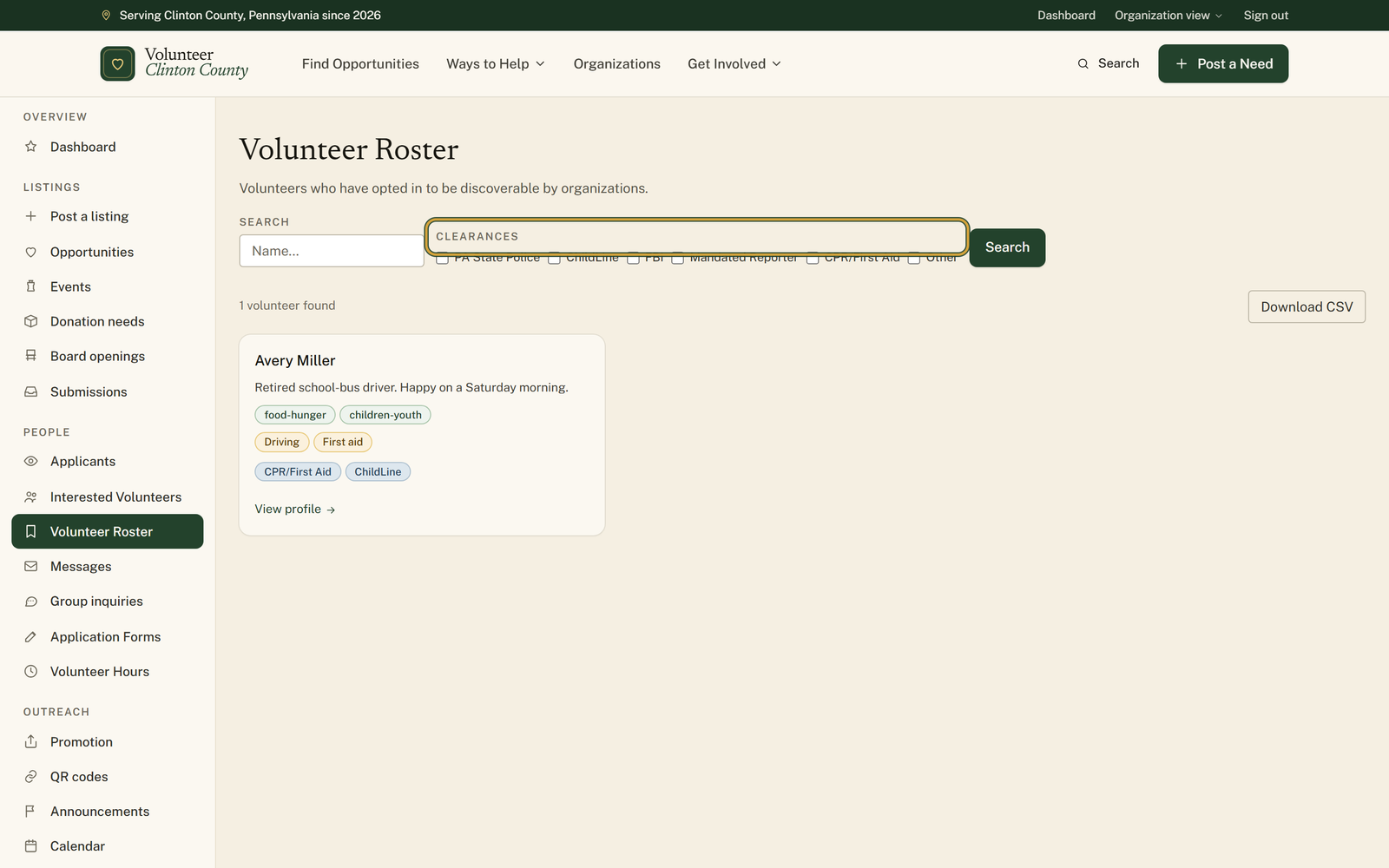
You'll know it worked when: A roster entry with your name, the fields you left ticked and the clearance types you hold, which staff can also download as a spreadsheet.
Watch out for: The checkboxes cover the bio, the interests, the skills, the availability and the two contact details. Your name and the kinds of clearance you hold have no checkbox of their own: while the switch is on, an organization can see both, and can search the roster for volunteers holding a particular clearance.
What this doesn't do: Not a public profile. None of this shows on the public site or reaches a search engine. The roster opens to signed-in organization staff at poster level or above, which means organizations generally rather than only the ones you have worked with, and switching the roster off removes you from it.
Signed-in organization staff on the site, at poster level or above. That is broader than the organizations you have volunteered with, so treat the roster as visible to local organizations generally rather than to one of them in particular.
Only if you tick "Email address" or "Phone number", and both start unticked. Otherwise an organization sees a message button and writes to you through the site, which leaves the next move with you.
Not at the moment. The clearance types you hold, and their dates, travel with a roster entry, and organizations can search the roster by clearance. The uploaded document is the part you do control, with the share box on each clearance row. If the types themselves are the problem, leave the roster switch off.
Your name, and not much else. If the bio, the interests, the skills and the clearances are all empty, the card reads "No additional details shared.", which is honest but no use to anybody. One ticked interest or one clearance on file is enough to replace that line with badges. Fill in the fields you are comfortable with first, then decide what to reveal.
Untick "Show me in the volunteer roster" and press "Save changes". You drop out of the roster and its search results. Past commitments and messages stay where they are, because those came from you approaching an organization rather than from the roster.
The roster search only counts clearances that have not expired, so an expired one will not put you in a filtered result. On your profile page an organization does see it, marked "Expired". Removing the row from your clearances page takes it off both.
Yes. The roster page has a Download CSV button, and it exports the same fields you chose to show, for every volunteer in the list, in one file. It carries your email address or phone number only if you ticked those boxes. Once a file leaves the site it is out of everyone's hands, which is the strongest argument for leaving the contact boxes alone.
Volunteer Clinton County is a community directory. You browse what local organizations post and contact them directly. More guides