Save a search and let the new matches come to you
Once the filters are set the way you want them, a box under the results keeps them and mails you what posts next.
A saved search stores the filters you had switched on, under a name you choose, and emails you the opportunities that have posted since the last message. You pick Daily, Weekly or Off for each one, and you can rename, re-run or delete it later from your Saved searches page. The email covers volunteer opportunities that are new since last time, so listings already on the site when you saved it never arrive that way.
Who this is for: People who know exactly what they are looking for and are tired of running the same search every fortnight to find out nothing changed.
Before you start: An account, because the search is stored against it.
- 1
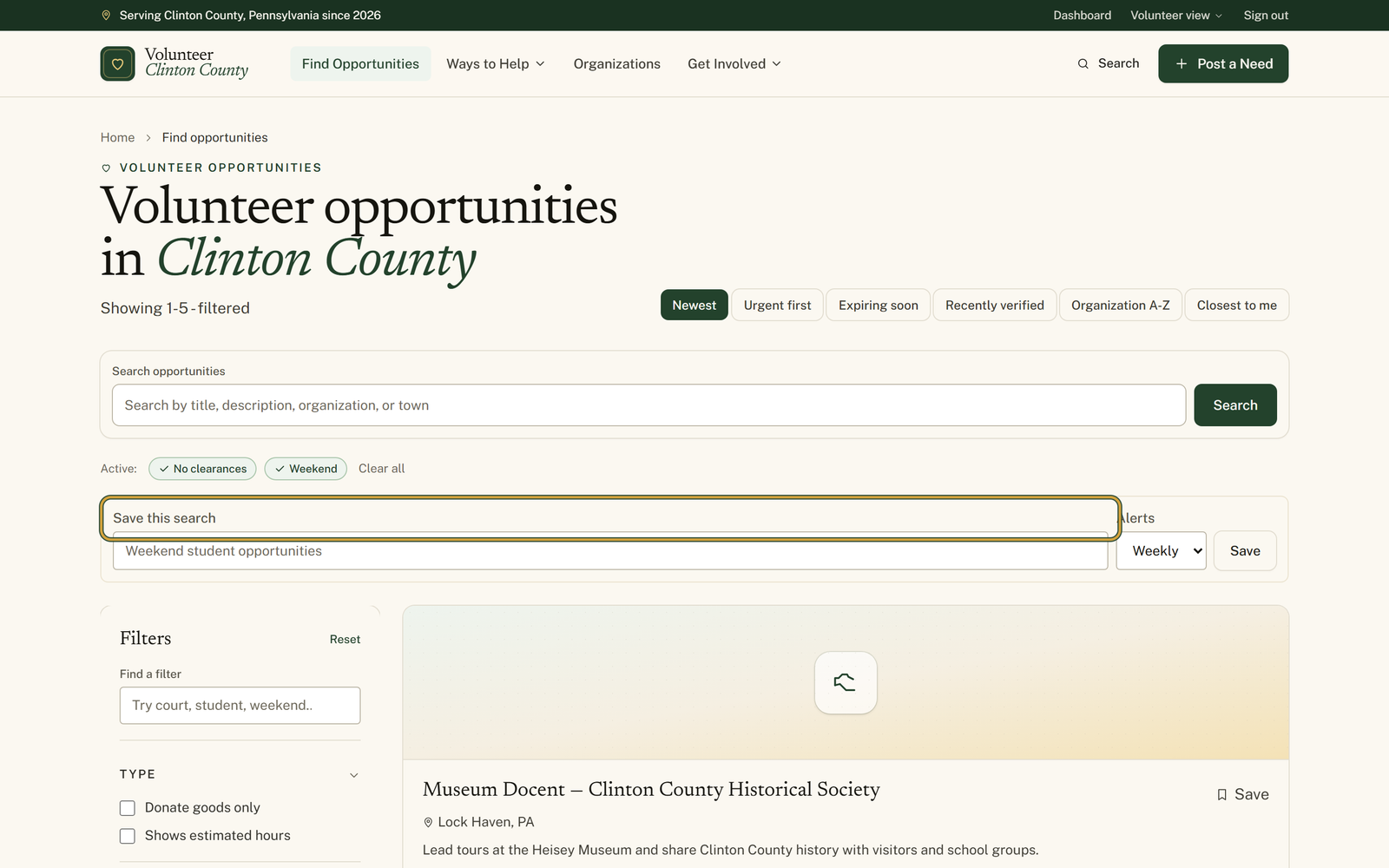
Sign in, then filter the opportunities page until it shows the kind of thing you want. The green "Active:" badges above the results are what gets saved.
- 2
Under those badges, find the box headed "Save this search" and give it a name, in the spirit of the greyed-out "Weekend student opportunities".
- 3
Set "Alerts" beside the name to "Weekly" or "Daily", press "Save", and watch for the line "Saved. Manage it from your volunteer dashboard."
- 4
Open "Saved searches" in the volunteer menu to find it again, carrying a badge for every filter it kept plus one reading "Alerts: Weekly".
- 5
Edit the "Name" or the alert setting there and press "Save", press "View" to run the search now, or press "Delete" to be rid of it.
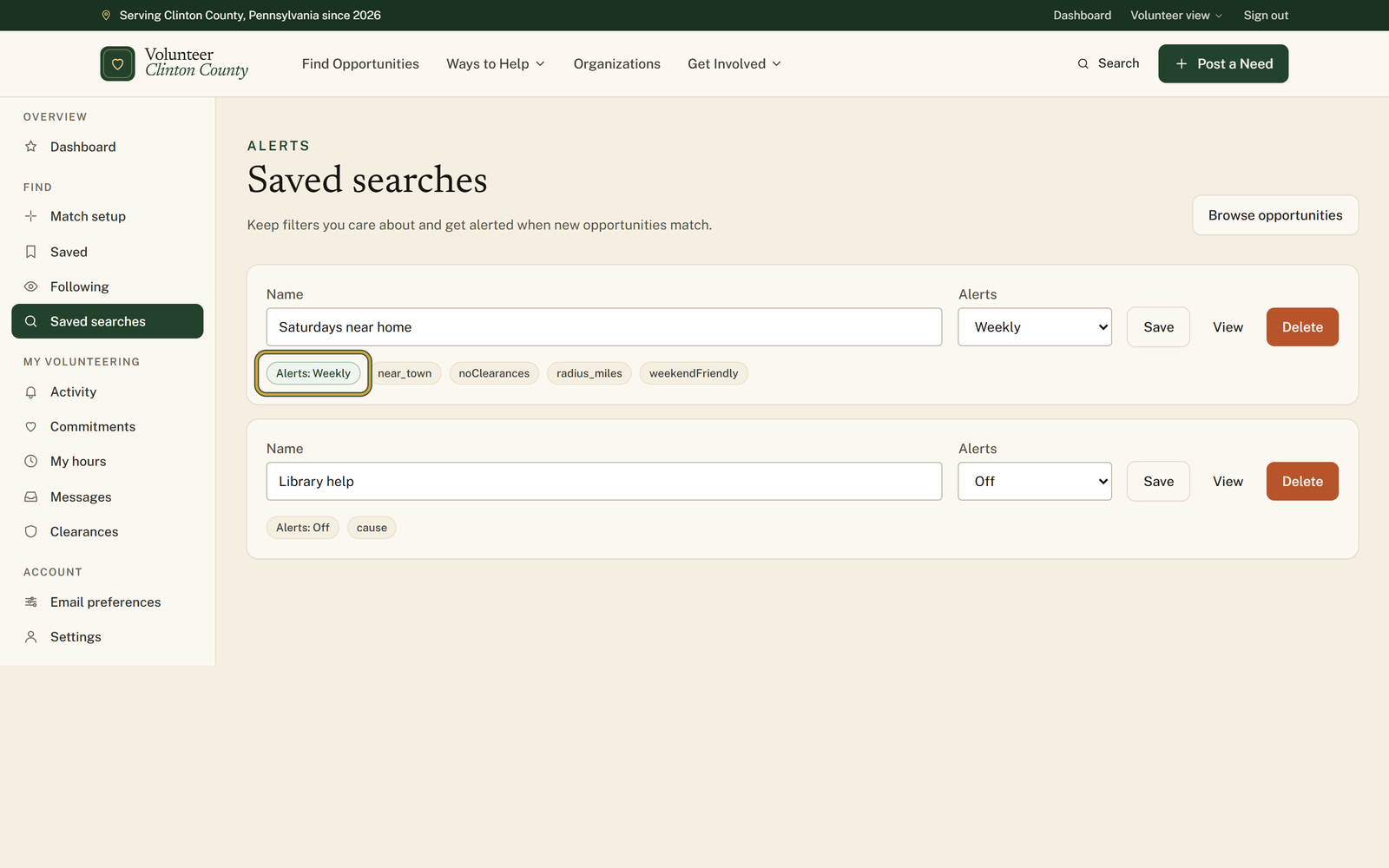
You'll know it worked when: A named search on your Saved searches page, and an email headed New VCC matches for that name whenever something new fits.
Watch out for: The "Save this search" box only exists once at least one filter is on. On an unfiltered opportunities page there is nothing above the results to save from, and a save with nothing meaningful set comes back with "Choose at least one filter before saving this search."
What this doesn't do: Not a standing copy of everything that matches. Each email carries only what was posted since the last one, so a listing that was already up when you saved the search will never be mailed to you. Press View to see the full set.
Notify me asks for an email address and nothing else, copies the cause and the town off the listing you were reading, and sends on Friday with up to five new ones. A saved search needs an account, keeps the filters you had on, including keywords, distance and requirements, sends Daily or Weekly as you choose, and carries up to eight. Use Notify me for a passing interest and a saved search for the thing you actually want.
The job runs once a day. A search set to Daily waits at least twenty hours between messages, a Weekly one waits about six and a half days, and neither sends anything on a run where nothing new matched.
Only listings posted since your last email count, and the clock starts the day you saved the search. Matches that were already on the site are not mailed to you. Press View on the search to see all of them.
Set "Alerts" to "Off" on the Saved searches page and press "Save". The search stays in your list with an "Alerts: Off" badge and the "View" button still runs it whenever you want.
Names have to be different from each other. Reusing one answers "You already have a saved search with that name." Add the town or the day to tell the two apart, as in Saturdays near home and Saturdays in Renovo.
It remembers the filters, including a town, ZIP and radius from the Distance section. Sorting by closest is not kept as a sort, though the distance you set still shapes what the emails contain.
Volunteer Clinton County is a community directory. You browse what local organizations post and contact them directly. More guides