Field requests from scout troops and work teams
When a class or a work team wants to come as a group, their headcount, ages and possible dates arrive together in one place.
A group inquiry is one planning note from a club, class, workplace or family who want to volunteer together. It carries the group name, roughly how many people, their ages, the dates they could do and whatever they wanted to ask, and it lands in a Group Inquiries inbox where you move it from New through to Scheduled or Declined. It is a conversation starter, not a booking: nothing is reserved and no date is held until you agree one.
Who this is for: Organizations that can absorb eight people on a Saturday and would rather know that before the eight people arrive.
Before you start: Owner, manager or poster access to read and work the inbox. Step one lives on the Organization Profile page, which takes owner or manager access.
- 1
Tick "We accept group volunteer events (e.g. corporate days of service)." on your Profile so groups can pick you from the county-wide form.
- 2
Tick "Group-friendly" on any volunteer opportunity that suits a crowd, which puts a "Bring a group" card on that opportunity's public page. That box is on opportunities only, not on events, donation needs or board openings.
- 3
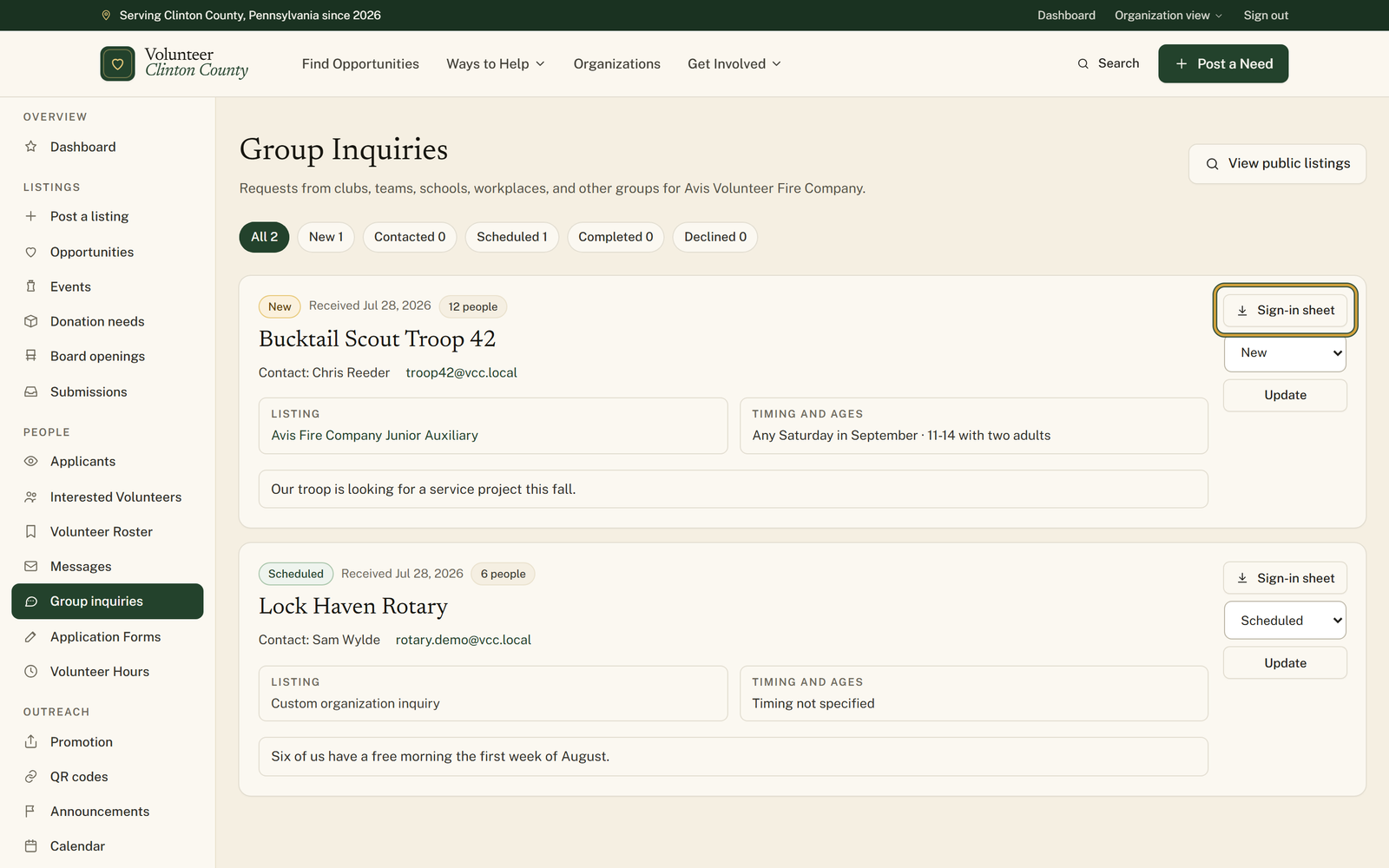
Open "Group inquiries" in your portal menu when one arrives. New requests carry a gold "New" badge and the date they came in.
- 4
Read the card. The "Listing" panel says which posting they were looking at, and "Timing and ages" gives you their dates and who is coming.
- 5
Reply from the "Contact:" line on the card. The email address and phone number are live links rather than text you have to copy out.
- 6
Set the dropdown to "Contacted", then "Scheduled" or "Declined" as things settle, and press "Update" so the next person on your team knows where it stands.
- 7
Press "Sign-in sheet" a day or two before to download a spreadsheet already filled in with the group details and one blank row per expected person.
You'll know it worked when: One card per group carrying the name, headcount, ages, dates and message, with a status you keep current and a sign-in sheet ready to print.
Watch out for: The emailed heads-up only goes to owners and managers who have the Volunteer interest notification switched on in their settings. A poster can work the inbox but is never emailed about it, so if your owners have that toggle off, inquiries stack up quietly and somebody has to open the page on a schedule.
What this doesn't do: Not a booking and not a calendar hold. Nothing is confirmed until you reply and agree a date between yourselves, and setting the status to Scheduled tells your team, not the group.
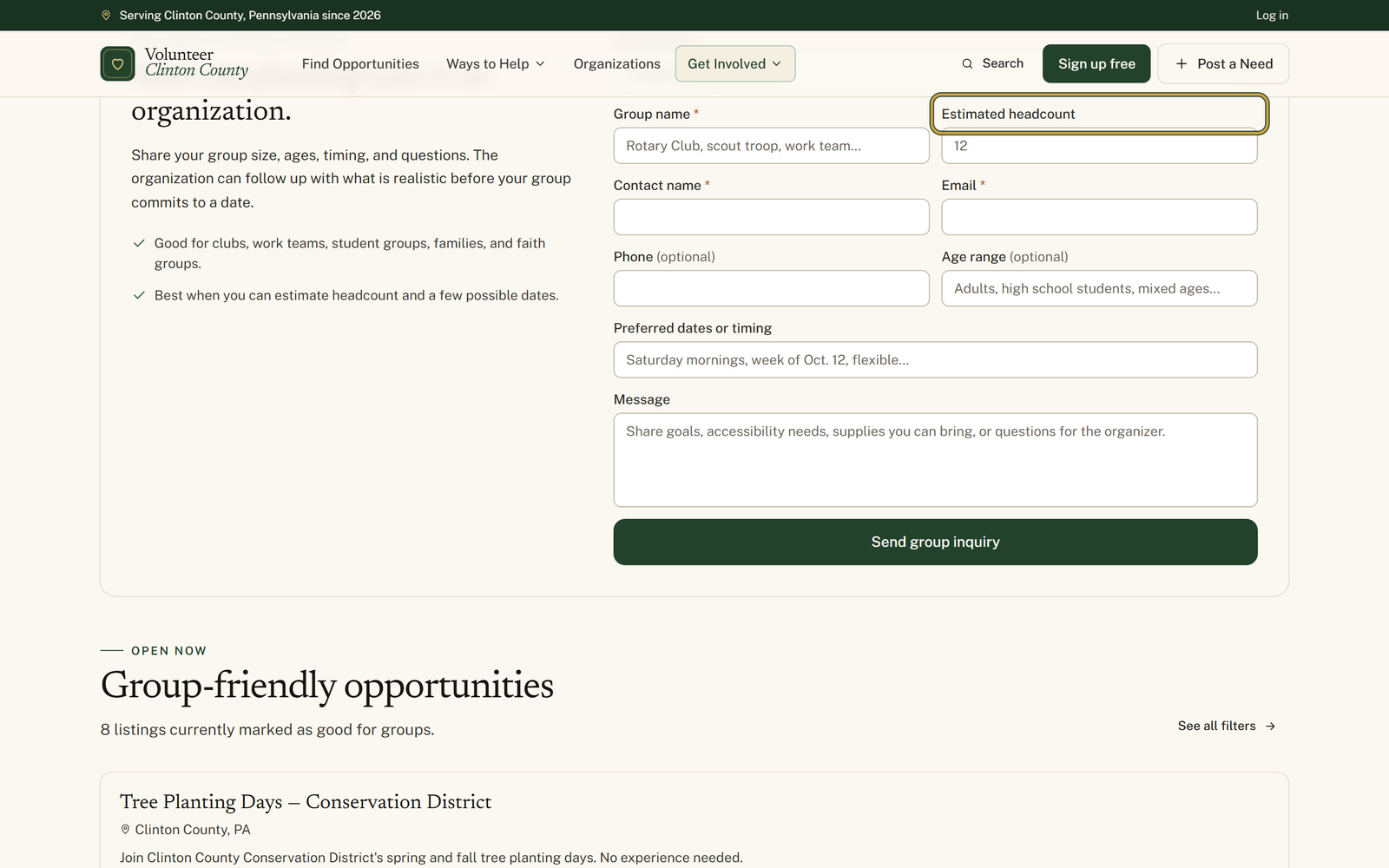
Two ways. The county-wide group page has a form with an organization picker, and your organization shows up there once it is approved, publicly listed and set to accept group volunteer events. Separately, any volunteer opportunity you mark Group-friendly carries a Bring a group card with the same form attached to that specific posting. Group-friendly is an opportunity setting only, so events, donation needs and board openings do not carry the card.
The group name, a contact name and an email are required. Headcount, ages, preferred dates, a phone number and a message are all optional but prompted, which is why most inquiries arrive with enough detail to answer in one reply rather than three.
New, Contacted, Scheduled, Completed and Declined, and they are for your team rather than the group. The filter pills across the top count how many sit in each one, so a glance tells you whether anything has been left in New for a week.
A spreadsheet already carrying the group name, the listing, the status, their dates, their ages and their contact details, followed by one blank row per expected person with columns for attendee name, email, phone, whether they attended, hours, signature and notes. Without a headcount it gives you twenty blank rows, and it stops at two hundred however large the group said it was.
No. Nothing is reserved, no capacity is taken and nobody is signed up. It is a message asking whether a group day is realistic. The date exists once you have agreed it with them by email or phone.
Volunteer Clinton County is a community directory. You browse what local organizations post and contact them directly. More guides