Run event day: roles, check-in, walk-ins and paper
Split the event into roles with their own hours and headcounts, then check people in by role on a phone or on paper.
The plan page breaks one event into volunteer roles, each with a start time, an end time and its own capacity. On the day, the check-in page lists everyone by role so you can check them in, mark a no-show, or add a walk-in by name, and a printable sign-in sheet carries blank rows for whoever turns up unannounced. It handles the volunteers working your event, not the public who come to it.
Who this is for: Whoever runs the pancake breakfast, the festival or the cleanup and needs different people at different hours.
Before you start: An event on your account, and owner, manager or poster access to the organization that posted it.
- 1
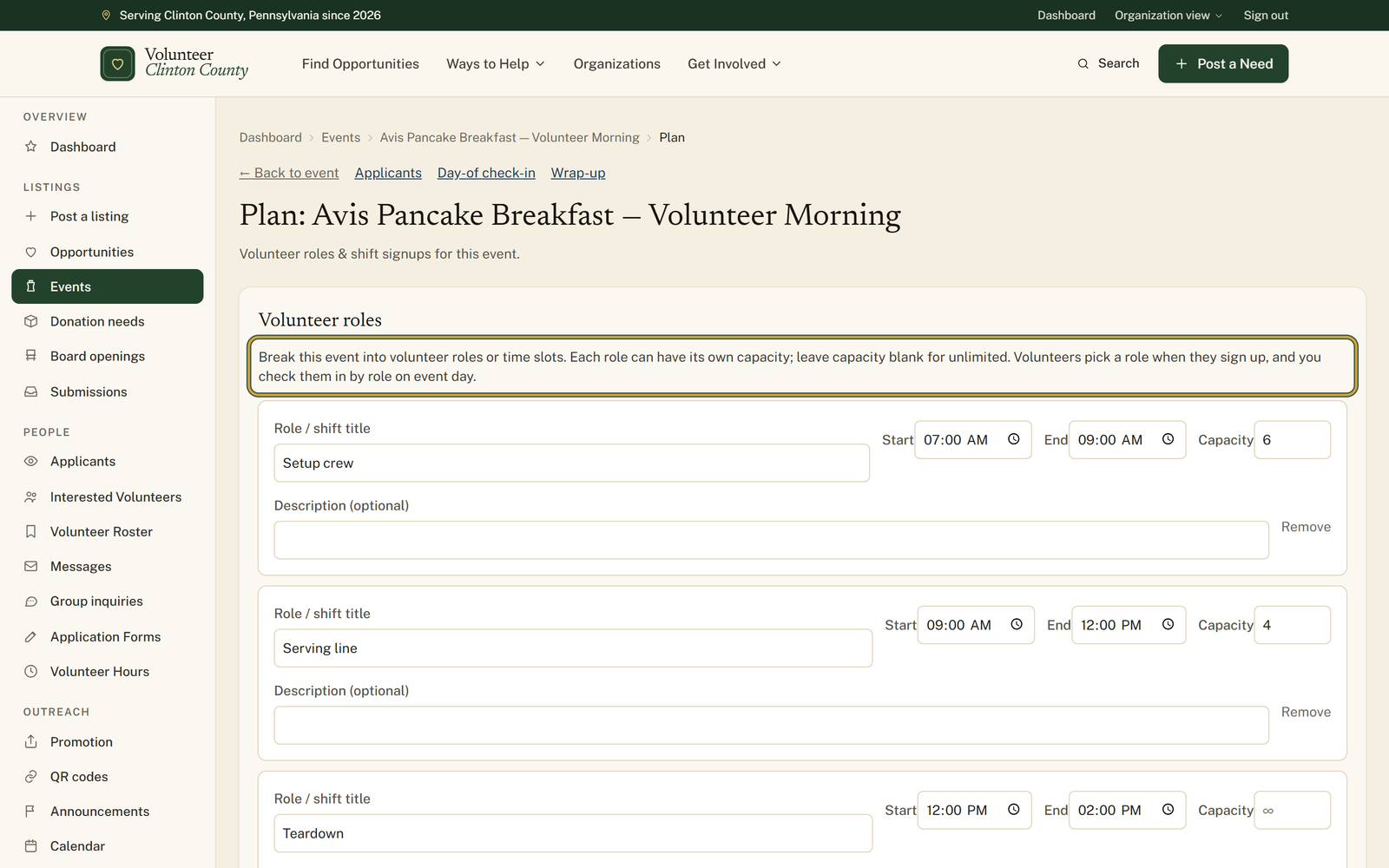
Open "Events", press "Edit" on the event, then follow "Roles & check-in" to the plan page.
- 2
Under "Volunteer roles", press "+ Add role" and fill in "Role / shift title", "Start", "End" and "Capacity". Leave capacity blank and that role takes as many people as show interest.
- 3
Press "Save roles". Volunteers now get "Pick a volunteer role" on the public event page, with each role showing how full it is.
- 4
Print your paper backup from "Print sign-in sheet" the day before. Every role gets a table with "Name", "Signature", "Time in" and "Time out", padded out with blank rows.
- 5
On the day, open "Day-of check-in" and press "Check in" beside each person as they arrive, or "No-show" when they do not. "Undo" fixes either one.
- 6
Type into "Add walk-in name…" and press "Add" for whoever turns up unannounced. They join that role with a "Walk-in" badge.
- 7
Keep "Day-of check-in" open on a tablet or laptop at the door. The code beside the header, captioned "Volunteers scan to check themselves in", lets anyone who signed up with an account check in without you. It is on that screen, not on the printed sheet.
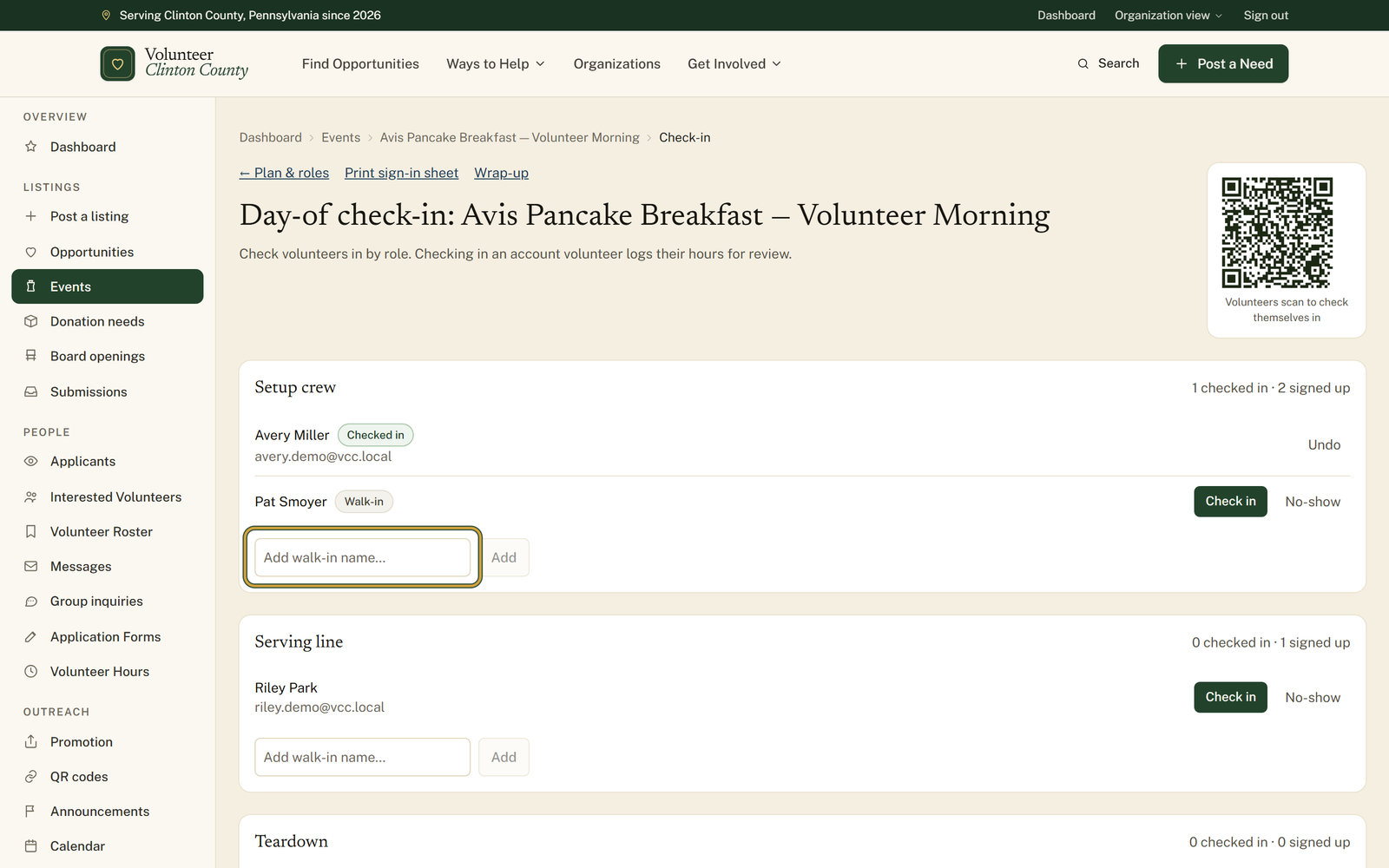
You'll know it worked when: Each role reading how many are checked in against how many signed up, with walk-ins named and no-shows marked.
Watch out for: The scan-yourself-in code only works for somebody who has an account here and already signed up for a role. Everyone else is told they have not signed up yet, so those people still get checked in from your side.
What this doesn't do: This counts the volunteers working your event, not the public who come to it. There is no ticketing here and no headcount of the crowd.
The button on the public event page changes from Sign up to Join waitlist, and anyone who joins carries a Waitlisted badge on your roster. Waitlisted people are not counted in the signed-up number and cannot check themselves in with the code, so if one of them turns up and you have room, check them in yourself.
Yes, and the page tells them so: switching roles moves your signup to the new shift rather than adding a second one. Your roster follows along, so the person appears under whichever role they picked last.
Check-in still works. The page says the event has no volunteer roles, so everyone checks in on one list, and offers a link to add roles on the plan page. Roles are worth it when different people are needed at different hours, and overkill when everyone arrives at once. One catch to know: the printed sign-in sheet is built role by role, so an event with no roles prints a page saying no volunteer roles are defined and gives you nothing to sign. If you want paper, add one catch-all role.
For a volunteer with an account, yes. Checking them in files an hours entry that lands in your Volunteer Hours page waiting for review, the same as one they logged themselves. Walk-ins added by name have no account for the hours to belong to, so they appear on the roster only.
The event name and date at the top, then one table per role with columns for Name, Signature, Time in and Time out. Everyone signed up is printed in, walk-ins are marked as such, and each table is padded to at least six rows so people who never signed up can write themselves in. Capacity is printed beside the role name.
Volunteer Clinton County is a community directory. You browse what local organizations post and contact them directly. More guides